

Imagine this. Someone nearby needs a service you offer. They pull out their phone and search. Over 80% of local searches like this one end in a store visit. But if your business is hidden on Google Maps, those customers will find your competitor instead. This guide is your roadmap to changing that. We’ll walk you through exactly how to get your business found, chosen, and visited by more local customers using Google Maps SEO. There are simple steps you can begin right now, without any complicated terminology.
What Is Google Maps Marketing?
Google Maps marketing is about how your business appears when a local person searches for what you have to offer. It focuses on maintaining Google Business Profile so that actual people can easily learn about you, your business, and how to contact you. This entails maintaining accurate information, adding images that accurately represent your business, answering reviews, and remaining active. The goal is straightforward. Encourage clients to choose you with confidence. Google is more likely to trust your business and display it to the right people at the right moment when it sees consistent and clear information.
Why Is Google Maps Marketing So Important?
The numbers tell a powerful story. Google handles billions of searches for local businesses every single day. For “near me” searches and queries like “plumber near me” or “best coffee shop,” the map results are the very first thing people see.
Also appearing here puts you directly in front of customers at the precise moment they are ready to make a decision. It builds trust before a customer ever speaks to you. A polished profile with photos and reviews is often the deciding factor between you and the business next door. Simply put, if you have a physical location or serve a local area, this is where your customers are looking.
How Google Maps Ranking Works
Google wants to connect people with the best local answer to their search. To decide who shows up first, it looks at three main things.
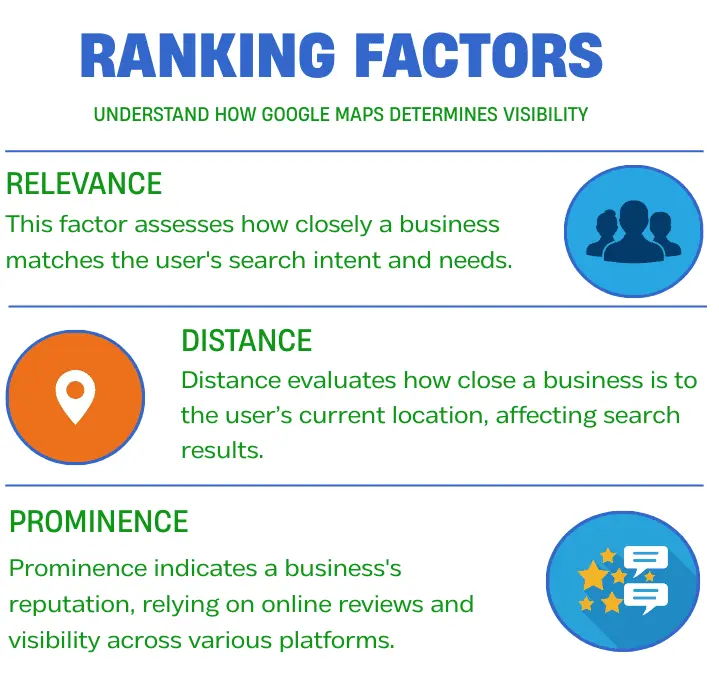
- Relevance asks, “Does this business match what the person is looking for?” This comes from your business name, category, and description.
- Distance considers how close the business is to the searcher’s location. You can’t move your shop, but you can ensure your service area is correctly set.
- Prominence is about your business’s reputation and authority. Google measures this through your reviews, how often your profile is clicked, the number of photos, and mentions on other websites. This is where your active optimization makes the biggest impact.
The Step-by-Step Google Maps Optimization Framework
Let’s build your presence from the ground up.
Claim and Verify Your Google Business Profile
Your journey starts here. Search for your business name on Google. If you see a panel on the right with your business information, you likely have an unclaimed profile. Click “Claim this business” or “Own this business?” and follow the steps. Google will need to verify you, usually by mailing a postcard with a code to your business address. This is a crucial security step. Until you verify, you cannot manage your information or see how customers find you.
Complete Every Profile Section
Your Google Business Profile is your digital business card. A fully completed profile builds trust, improves visibility, and encourages customer engagement. Leaving fields empty or incomplete can reduce clicks and limit your presence in local searches.
For a detailed, step-by-step walkthrough of every field, see our Google Business Profile optimization checklist for 2026.
- Business Name, Address, Phone: Always use your real, consistent business name, address, and phone number (NAP). Never add extra keywords to your business name, as this violates Google guidelines and can hurt rankings. Consistency across your website, directories, and social profiles is essential for credibility and local SEO.
- Hours: Be precise with your operating hours, including regular schedules and special holiday or event hours. Accurate hours prevent frustrated customers, reduce negative reviews, and signal reliability to Google. Regularly update them whenever changes occur.
- Categories: Choose a primary category that best represents your main service or product, as it strongly influences relevance in searches. Add secondary categories that accurately describe other services you provide to capture a wider range of searches without diluting your main focus.
- Description: Craft a clear, keyword-aware description that explains what your business does, who it serves, and where. Use natural language that a potential customer would use. Avoid overloading with keywords; clarity and readability matter most.
- Photos and Videos: Upload high-quality images of your storefront, interior, team, products, and services. Profiles with photos get significantly more clicks. Regularly update visuals to show your business is active, trustworthy, and engaged. Consider videos or virtual tours to enhance engagement and stand out in search results.
A complete and carefully maintained profile not only improves Google Maps rankings but also builds confidence with potential customers, increasing calls, visits, and conversions.
Link On-Page SEO With Your Profile
Your website and your Google Business Profile should work as a team. Your On-page information must match your profile details exactly. Keep your business name, address, and phone number (often called NAP) the same on your website’s contact page. Create location-specific pages if you serve multiple areas. Use local keywords in your website content that align with what customers search for. This consistency tells Google your business is legitimate and firmly rooted in your community.
Build Local Authority with Off-Page SEO
Google looks at the wider web to confirm your local standing. Citations are online mentions of your business name, address, and phone number on other sites like local directories, chambers of commerce, or industry associations. Ensure these citations are accurate and consistent. Getting backlinks from other reputable local websites, like a news site covering a community event you sponsored, is a powerful trust signal. It shows your business is an established part of the local fabric.
Master Reviews and Google Q&A
Reviews are the modern word-of-mouth. Actively ask your happy customers to leave a review on your Google profile. Respond to every single review, both positive and negative. Thank those who praise you. For negative reviews, respond professionally and offer to take the conversation offline to resolve the issue. This shows you care. Also, monitor the Google Q&A section on your profile. Proactively add common questions and answers, and politely answer any questions customers post.
Advanced Local Search Strategies
Once the basics are solid, these tactics give you an extra edge.
Use Google Posts Strategically
Google Posts are like social media updates on your profile. Use them to share updates, announce events, highlight a new product, or promote a special offer. They keep your profile fresh and give customers a reason to click. Posts only last for a short time, so make a habit of adding a new one every week or two.
Utilize Attributes and Products
Attributes are specific features you can add to your profile, like “wheelchair accessible,” “women-led,” “offers free Wi-Fi,” or “has outdoor seating.” These help you stand out and match specific customer needs. If you sell items, use the Products section to showcase them directly on your profile. For services, use the Services section. This turns your profile from an information panel into a mini-website.
Implement Local Schema Markup
This is a technical step for your website. Schema markup is a code you add to your site that tells search engines exactly what your business is, your NAP, hours, price range, and more in a language they understand perfectly. For example, local schema markup uses structured data to help Google clearly understand your business details and display them accurately in search results. This makes it easier for Google to show your information in rich results. While it may require developer help or a plugin, it is a strong signal of clarity and trust.
Common Mistakes to Avoid
Maintaining a strong Google Business Profile requires careful attention. Avoiding these common mistakes protects your visibility and trustworthiness:
- Inconsistent Information: Using different names, addresses, or phone numbers across your website, directories, and profile confuses Google and customers. Consistency is critical for local SEO and trust.
- Ignoring Reviews and Q&A: Not responding to reviews or questions makes your business appear inactive or indifferent. Regular engagement shows customers that you care and improves your prominence on Google Maps.
- Using a PO Box or Virtual Office: Google requires a real, physical location or a valid service area. Using a PO Box or virtual office can cause verification issues or even profile suspension.
- Keyword Stuffing: Adding extra keywords to your business name violates Google guidelines. This can result in penalties or reduced visibility, so always use your official business name.
- Setting and Forgetting: Your profile is not static. Regularly update photos, posts, services, and other information. Active profiles signal reliability to Google and encourage more customer interactions.
Avoiding these pitfalls ensures your profile remains credible, engaging, and optimized for local search results.
Track Your Success with Key Metrics
Your Google Business Profile dashboard is your control center. Pay close attention to.
- How customers search for your business: What terms are they using to find you?
- Where customers view your business on Google: Are they seeing you in Search or on Maps?
- Customer Actions: Track the number of phone calls, direction requests, and website clicks directly from your profile.
- Photo Views: See how many people are looking at your photos.
- Review Trends: Monitor your average rating and the number of new reviews.
Results You Can Expect
This work pays tangible dividends. Businesses that fully optimize their profiles typically see a significant increase in profile views and customer actions. You can expect more phone calls, more requests for directions, and more visitors to your website, all from people actively looking for what you offer in your area. This directly translates to more foot traffic and sales. Your online reputation becomes a powerful asset, lowering the barrier for new customers to choose you.
Conclusion
Your presence on Google Maps is no longer optional. It’s the cornerstone of local discovery. By following this framework of claiming your profile, completing it in detail, engaging with customers, and tracking your results, you systematically build the visibility and trust that drives local growth.
Your next step is simple. Open a new browser tab right now. Search for your business on Google. Look at your profile through the eyes of a new customer. Is it complete? Is it inviting? Start with one action. Add three new photos. Respond to two reviews. Create your first Google Post. The path to being found by your next local customer begins today.
FAQs
Q1. How do I rank higher on Google Maps?
You can rank higher by completing your profile, selecting the right category, receiving more reviews, adding photos, and maintaining consistent business information online.
Q2. How long does Google Maps SEO take?
Google Maps SEO usually shows early movement within 2 to 6 weeks after proper optimization. This includes profile completion, review activity, and citation consistency. In less competitive areas, results can appear faster. In competitive cities or industries, it may take several months of steady effort. Ongoing activity, such as new reviews, posts, and photos helps maintain and improve rankings over time
Q3. Is Google Maps SEO free?
Yes. Google Maps SEO is completely free. You do not need to run ads to appear in local map results. The investment is time and consistency. Businesses that regularly update their profile, engage with customers, and maintain accurate information often outperform competitors who rely only on paid ads.
Q4. How important are reviews for Google Maps SEO?
Reviews strongly influence both rankings and customer trust. Businesses with more positive and recent reviews appear more prominent and are more likely to get clicks, calls, and visits.
Q5. Can a service area business rank on Google Maps?
Yes. Service area businesses can rank without a public storefront. Proper verification, correct service area settings, strong reviews, and accurate profile information are essential.
Q6. Do photos help Google Maps rankings?
Yes. High quality photos increase profile engagement, build trust, and encourage users to take action. Higher engagement helps improve Google Maps visibility.
Q7. Is Google Maps SEO worth it for small businesses?
Yes. Google Maps SEO delivers high-intent local traffic without ongoing ad costs. People who find your business on Maps are usually ready to call, visit, or book. For small businesses, this makes it one of the highest return marketing channels available. A well-optimized profile can consistently generate leads long-term with minimal expense.